Instructions for Use
Reels Millionaire
Success Guide
This folder contains templates for checkout pages which can be used in any funnel. Here's how to use them.
Copy the Template
As always, copy the template first.
Update the Products
If you haven't already, create a product under Payments > Products tab.
[Reminder - if you're selling a course, you'll need to add the Membership offer to the product]
On the funnel list page, add the product to the checkout page and add any order bumps if needed.
Update the Checkout page
Some templates includes order bumps if you need them.
If you don't need them, use the ones that don't or just click the checkout form and remove them.
If you are adding bumps, you'll see a bit of code we use to make the bumps look good as below.
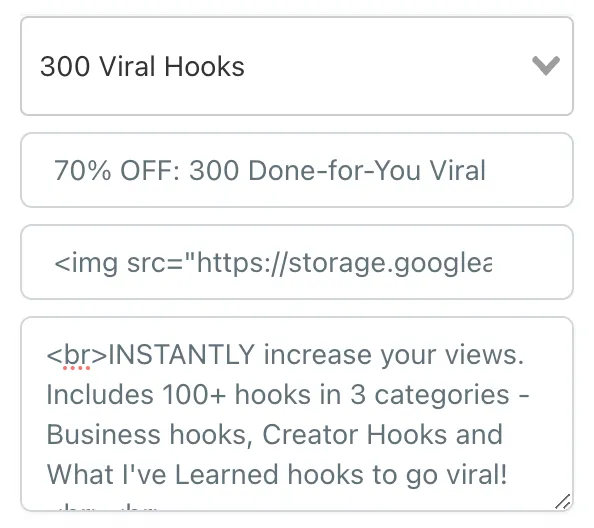
For the bump image:
{link to your image, get the link from the Media area}" style="width: 25%; float: left; margin-right: 10px; vertical-align: middle;">ONE TIME OFFER, $37<br>
For the description, just add '<br>' to the beginning and end, as below:
<br>INSTANTLY increase your views. Includes 100+ hooks in 3 categories - Business hooks, Creator Hooks and What I've Learned hooks to go viral!<br><br>
And make sure the confirmation button goes to the page you want.
Update the Thank You page
Update your order confirmation page with the necessary information.
If you're selling a course, you'll want to point them to the login details and if remind them to reset their password if it's their first time logging in.
Create / Assign your Automation
And finally you'll need a confirmation email for your customer.
If you have an existing automation, make sure it's working for this funnel.
If you don't, create a new automation using our templates.
Thanks for being part of Social Boom. Before you cancel, please watch the video above FIRST and consider...
1. The Value in the Membership
Your subscription includes the content here plus weekly Q&A's, live Masterclasses and support whenever you need it, plus new weekly content too.
2. The Very Small Time Needed to Use What's in the Portal
Each task in the portal can be done in a matter of minutes, and each will bring a very specific result on your social FAST. You may not 'see' that result instantly, but we promise everything we teach accelerates your journey.Don't think you need to do it all - just take small steps and you'll see big results!
3. Getting a Month Free
We'd love to give you a month of Social Boom FREE to say thanks for being with us!
Please click the chat button at the bottom right to arrange it.
4. Cancelling your Subscription
If you'd still like to cancel, we'd like to thank you for being with us, you're welcome back any time :)
Please click the chat button at the button right for details.